Icon of program: vanBasco Karaoke Player

vanBasco Karaoke Player for Windows

Free Download for Windows

View an ad to download for free

Classic karaoke program

vanBasco Karaoke Player is a free karaoke and multimedia program for anyone who loves old-school singing sessions. It helps you turn your PCs into simple karaoke machines. It’s perfect for those who have a collection of classic MIDI or karaoke files ready to go without needing an actual karaoke unit.

Unlock your creativity with Adobe Stock

Get 10 images or 1 video with a free trial

vanBasco Karaoke Player remains a go-to choice for hobbyists who want a no-fuss setup without monthly subscriptions. It’s built on simplicity, focusing on the basics of lyrics and music playback. It serves as a reliable bridge between the golden era of home karaoke and modern high-definition digital sound systems of today.

Sing your heart out

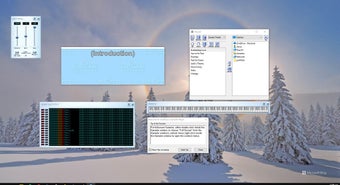
vanBasco Karaoke Player’s flexible six-window system allows you to customize every part of your experience. You can easily drag and drop files into the playlist while monitoring notes on a virtual piano. The layout is very straightforward and emulates real karaoke machines, and the ability to change the background image or text color makes the lyrics window easy to read on any screen.

Beyond the visuals, the player gives you a surprising amount of control over your performance. You can quickly adjust the tempo and key to match your voice, which is great for songs that are a bit too high or fast. The real-time MIDI output even lets you mute specific instruments, helping you focus on the melody or a particular backing track beat right away.

However, the program shows its age with a user interface that feels trapped in the past. Since it relies on MIDI files, the audio quality can sound a bit robotic depending on your computer's sound card. There is also no way to record your voice directly, and the software lacks a built-in library, so finding actual songs to sing is entirely up to you.

Classic program with all the pros and cons

vanBasco Karaoke Player is a charming program for anyone who appreciates the simplicity of classic karaoke. It may not have the fancy graphics of modern apps, but its reliability and custom features make it a solid free option. If you don't mind searching for your own tracks and using a retro interface, it is a fun addition to any party or a solo session.


  • Pros

    • Supports custom skins and colors
    • Adjustable song tempo and key
    • Real-time MIDI instrument control
  • Cons

    • Outdated retro visual design
    • Requires external song file downloads
    • No built-in voice recording
 0/1

App specs

  • Developer

    • Vanbasco
  • License

    Free

  • Version

    2.53

  • Latest update

  • Platform

    Windows

  • OS

    Windows Vista

  • Language

    English

    Available languages

    • German
    • English
    • Spanish
    • Italian
    • Polish
  • Downloads

    627.4K

    Last month's downloads

    • 1.4K
  • Size

    815.10 KB

Program available in other languages


Icon of program: vanBasco Karaoke Player

vanBasco Karaoke Player for PC

Free Download for PC

View an ad to download for free


User reviews about vanBasco Karaoke Player

3.6

6 reviews

Add review

Main reviews for you

  • Anonymous user

    All the midi files. i think its a great player for all the midi files i it before but when i changed my windows 7 in windows 10 i loose my data

  • Anonymous user

    Instal the vmidi.exe as administrator! :). cancel na current installation..then open the setup by administrator (right click the vmidi.exe then choose "run as administrator") .. it should be working! have a great day! :)

  • Anonymous user

    I dont get my choice of ongs that i want to learn! . i dont get my choice of ongs that i want to learn. it has a list of ancient songs !

  • Anonymous user

    Great program finally got it to work on windows 7. had problem installing at first then changed the location where it was installed to C, now it works perfectly. i love vanbasco, thanks Pros: great karaoke player love it. Cons: the only problem i have is that i can't always find the songs i'm looking for and theres not enough time in the day to sing them all. :)

  • Anonymous user

    Windows 7 compatability. I to have recently bought a new laptop with windows 7. I am having problems with the drums,sometimes they play sometimes they don't.Anybody have any ideas how to fix this problem. Kenny

  • Anonymous user

    Alleged incompatibility with win7 that shows fatal error during installatio. Just go to the folder where you downloaded the vanbasco installer, right click the file, click on properties then unblock then ok. presto your van basco will now install on win7 os.

More

You may also like

Alternatives to vanBasco Karaoke Player

Explore Apps

Latest articles

Laws concerning the use of this software vary from country to country. We do not encourage or condone the use of this program if it is in violation of these laws.
Softonic

Is vanBasco Karaoke Player safe?

Score result: Clean

This file passed a comprehensive security scan using VirusTotal technology. It is safe to download.

  • Virus free
  • Spyware free
  • Malware free
  • Verified by Security Partners

    VirusTotal logo

Scan Info

Last scan
Wednesday, December 2, 2020
Scan provider
VirusTotal

Softonic security commitment

vanBasco Karaoke Player has been thoroughly scanned by our advanced security systems and verified by industry-leading partners. This file comes from the official developer and has passed all our security checks, showing no signs of viruses, malware, or spyware. For more information, visit our Security and Trust Center

Signed in to Softonic as